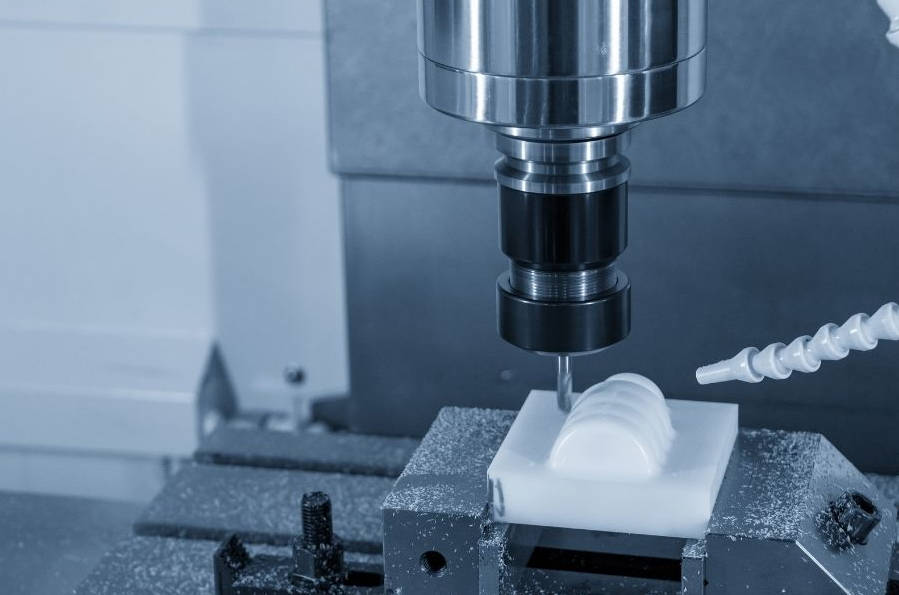
Calculating the feed rate for CNC milling is a critical step for any machinist, as it directly impacts tool life, surface finish, and overall efficiency. The fundamental formula to determine feed rate is: Feed Rate (IPM) = Spindle Speed (RPM) × Number of Flutes × Chip Load (IPT). Mastering this calculation and the variables that influence it transforms a good machinist into a great one, allowing you to move beyond generic charts and truly optimize every cut for the specific tool, material, and machine you’re working with.
This comprehensive guide will walk you through every step of the process, from understanding the core variables to making advanced adjustments for real-world conditions. We’ll break down the formulas, provide practical examples, and explore the nuances that separate a rough starting point from a perfectly tuned cutting parameter.

Table of Contents
- Why is Calculating the Correct Feed Rate Crucial?
- The Core Formula for CNC Milling Feed Rate
- Step 1: Calculating Your Spindle Speed (RPM)
- Step 2: Determining Chip Load (Feed Per Tooth)
- Step 3: Putting It All Together – A Practical Example
- Beyond the Basics: Advanced Adjustments and Considerations
- Common Mistakes to Avoid When Calculating Feed Rate
- Frequently Asked Questions (FAQ)
- Conclusion: From Formula to Finesse
Why is Calculating the Correct Feed Rate Crucial?
Before diving into the math, it’s essential to understand why this calculation matters. An incorrect feed rate isn’t just inefficient; it can be destructive. A feed rate that is too slow can cause rubbing instead of cutting, leading to excessive heat, work hardening of the material, and premature tool wear or failure. Conversely, a feed rate that is too high can overwhelm the tool, causing it to chip, break, or produce a poor surface finish. The right balance ensures:
- Optimal Tool Life: Each cutting edge takes a proper “bite” of material, efficiently evacuating heat with the chip and minimizing wear.
- Superior Surface Finish: A consistent and correct chip load prevents chatter and rubbing, resulting in a cleaner, more accurate final part.
- Reduced Cycle Times: Running the machine at its optimal, safe speed means parts are completed faster, increasing shop throughput.
- Improved Machine Health: A smooth, controlled cut puts less strain on the machine’s spindle, ball screws, and axis motors, reducing wear and tear over time.
The Core Formula for CNC Milling Feed Rate
The foundation of all feed rate calculations is a straightforward multiplication formula. Whether you’re milling aluminum, steel, or titanium, this is your starting point.
Feed Rate (IPM) = RPM × Nt × CL
Let’s break down each component of this critical equation.
Breaking Down the Formula: What Do The Variables Mean?
Understanding each variable is key to applying the formula correctly. Each one is a piece of a puzzle that must be solved before you can calculate the final feed rate.
| Variable | Abbreviation | Unit | Description |
|---|---|---|---|
| Feed Rate | IPM / MMPM | Inches Per Minute / Millimeters Per Minute | The linear speed at which the cutting tool moves through the material. This is the value you input into your CNC controller (e.g., F25.5). |
| Spindle Speed | RPM | Revolutions Per Minute | How fast the cutting tool is rotating in the machine’s spindle. This is calculated based on the material being cut and the tool’s diameter. |
| Number of Flutes | Nt or Z | Count (Integer) | The number of cutting edges (flutes) on the end mill. |
| Chip Load | CL / FPT / Fz | Inches Per Tooth / Millimeters Per Tooth | The thickness of the material that each flute removes in a single revolution. This is the most critical and nuanced variable. |
Step 1: Calculating Your Spindle Speed (RPM)
You can’t determine your feed rate without first knowing how fast your tool should be spinning. Spindle speed isn’t just a random number; it’s derived from a material property known as Surface Feet per Minute (SFM) or Surface Meters per Minute (SMM).
The Role of Surface Feet per Minute (SFM)
SFM is the speed at which the outer edge of the cutting tool travels across the material’s surface. Think of it as the “speed limit” for a given material and tool combination. Softer materials like aluminum have a very high SFM (they can be cut quickly), while harder materials like stainless steel have a much lower SFM. This value is determined by tooling manufacturers through extensive testing.
The Spindle Speed Formula
To convert the material’s recommended SFM into a specific RPM for your tool, you use the following formula:
RPM = (SFM × 3.82) / Tool Diameter (in)
The constant 3.82 is a simplified value derived from (12 inches/foot) / π (3.14159), which converts the linear speed (SFM) into a rotational speed (RPM) based on the tool’s circumference.
Where to Find SFM Values?
The most reliable source for SFM values is the tooling manufacturer’s catalog or website. However, general machining handbooks and online resources provide excellent starting points. Below is a table with common SFM ranges for a carbide end mill.
| Material | SFM Range (Carbide Tool) |
|---|---|
| 6061 Aluminum | 800 – 2000 |
| 1018 Mild Steel | 400 – 700 |
| 304 Stainless Steel | 250 – 450 |
| Titanium (6Al-4V) | 100 – 200 |
Step 2: Determining Chip Load (Feed Per Tooth)
Chip load, or Feed Per Tooth (FPT), is arguably the most important factor in this entire process. It represents the thickness of the chip that each flute of your end mill carves away. A proper chip load ensures that you are cutting the material, not rubbing against it. This is crucial for heat evacuation, as most of the heat generated during milling is carried away in the chip.
What Exactly is Chip Load?
Imagine unwrapping the cutting path of a single flute over one revolution—the thickness of that material sliver is the chip load. If it’s too thin, the flute rubs and generates excess heat. If it’s too thick, it puts immense pressure on the tool, risking breakage. The goal is to find the “sweet spot” recommended by the tool manufacturer.
The Golden Source: Tooling Manufacturer Charts
Just like with SFM, the best place to find chip load data is directly from the company that made your end mill. These charts provide starting values based on the tool’s diameter, the number of flutes, and the material being machined. These charts are the foundation of good machining practice.
Factors that Influence Chip Load Selection
The manufacturer’s chart provides a starting point, but you may need to adjust it based on the specific operation. For example, a heavy roughing cut will use a larger chip load, while a delicate finishing pass will use a much smaller one to achieve a better surface finish. Below are some example chip load values for a carbide end mill.
| Material | Chip Load Range (per tooth) |
|---|---|
| 6061 Aluminum | 0.004″ – 0.010″ |
| 1018 Mild Steel | 0.003″ – 0.007″ |
| 304 Stainless Steel | 0.002″ – 0.005″ |
| Titanium (6Al-4V) | 0.0015″ – 0.004″ |
Step 3: Putting It All Together – A Practical Example
Let’s apply this knowledge to a real-world scenario. You need to machine a part from a block of 6061 Aluminum using a 1/2″ diameter, 4-flute carbide end mill.
1. Find Your SFM and Chip Load:
- From our charts (or a manufacturer’s catalog), we’ll select a conservative starting SFM for aluminum: 1200 SFM.
- For a 1/2″ end mill in aluminum, a good starting chip load is 0.005″ per tooth.
2. Calculate Spindle Speed (RPM):
- RPM = (SFM × 3.82) / Tool Diameter
- RPM = (1200 × 3.82) / 0.5
- RPM = 4584 / 0.5
- RPM ≈ 9168
3. Calculate the Feed Rate (IPM):
- Feed Rate = RPM × Number of Flutes × Chip Load
- Feed Rate = 9168 × 4 × 0.005
- Feed Rate = 36672 × 0.005
- Feed Rate ≈ 183.4 IPM
Your calculated starting parameters are a spindle speed of 9168 RPM and a feed rate of 183.4 IPM. You would program S9168 F183.4 into your machine and then listen and watch carefully during the first pass, ready to adjust as needed.
Beyond the Basics: Advanced Adjustments and Considerations
The basic formula provides an excellent starting point, but experienced machinists know that theory must be tempered with reality. Machine rigidity, toolpath strategy, and other factors require intelligent adjustments.
The Critical Concept of Chip Thinning
When your width of cut (also called radial engagement) is less than half the tool’s diameter, the *actual* thickness of the chip becomes thinner than your programmed chip load (FPT). This phenomenon is called radial chip thinning. To compensate, you must increase your feed rate to maintain the desired chip thickness and prevent rubbing. This is especially important in high-efficiency milling (HEM) toolpaths. While the exact formulas are complex, a simplified adjustment factor can be used.
| Width of Cut (% of Tool Diameter) | Feed Rate Adjustment Factor |
|---|---|
| 50% (Slotting) | 1.00 (No adjustment) |
| 30% | 1.10 (Increase feed rate by 10%) |
| 15% | 1.41 (Increase feed rate by 41%) |
| 5% | 2.24 (Increase feed rate by 124%) |
Adjusting for Depth of Cut (DOC) and Width of Cut (WOC)
The manufacturer’s recommendations are often based on ideal conditions, such as a DOC of 1x the tool diameter and a WOC of 50% the tool diameter. If you are taking a much deeper axial cut or a much wider radial cut, you must be more conservative. It’s often necessary to reduce your feed rate and/or RPM by 10-25% for very aggressive cuts to account for the increased tool pressure and heat generation.
The Impact of Machine Rigidity and Spindle Power
A heavy-duty, rigid industrial VMC can handle much more aggressive cuts than a lighter-duty benchtop or hobbyist CNC machine. If you hear chatter (a loud, vibrating noise) or see signs of deflection, your first step should be to reduce your feed rate. Your machine’s maximum spindle RPM and horsepower are also hard limits that may prevent you from reaching the “ideal” calculated speeds and feeds, requiring you to adjust accordingly.
Coolant’s Role in Feeds and Speeds
Using flood coolant, mist, or even a high-pressure air blast effectively evacuates chips and cools the tool. This often allows you to run at the higher end of the recommended SFM and chip load ranges. When cutting dry, you must be much more conservative, often reducing your parameters by 15-30% to prevent overheating the tool and workpiece.
Common Mistakes to Avoid When Calculating Feed Rate
- Ignoring Manufacturer Data: Always trust the tool manufacturer’s data over generic online charts when possible. They made the tool; they know how it performs best.
- Forgetting Chip Thinning: Not compensating for chip thinning on light-width cuts is a common cause of premature tool wear.
- “Set It and Forget It”: The calculation is a starting point. Always listen to the machine and inspect the chips. Blue, burnt chips mean too much heat. Loud squealing means something is wrong. A smooth cutting sound and well-formed chips are signs of success.
- Using the Wrong Units: A simple but costly mistake is mixing up inches and millimeters or SFM and SMM. Always double-check your units throughout the calculation.
Frequently Asked Questions (FAQ)
What is the difference between feed rate and cutting speed?
Cutting speed (measured in SFM) is a property of the material and tool—it’s the theoretical speed of the cutting edge. Feed rate (measured in IPM) is the programmed linear speed of the entire tool assembly through the material. You use cutting speed (SFM) to calculate the necessary spindle speed (RPM), which is then used to calculate the feed rate.
How do I know if my feed rate is too high or too low?
Listen and look. A feed rate that is too high often results in a loud, rumbling noise, poor surface finish, or a broken tool. A feed rate that is too low can cause a high-pitched squeal as the tool rubs, and you might see discolored or burnt-looking chips due to excessive heat. Perfectly formed, comma-shaped chips that are warm but not discolored are usually a sign that your parameters are dialed in.
Can I use an online feeds and speeds calculator?
Yes, online calculators like those from G-Wizard, Harvey Tool, or integrated into CAM software like Fusion 360 are excellent tools. They often account for advanced factors like chip thinning and machine profiles automatically. However, understanding the underlying formulas is crucial for troubleshooting and making intelligent on-the-fly adjustments at the machine.
Conclusion: From Formula to Finesse
Calculating the correct feed rate for CNC milling is a blend of science and art. The formulas provide the scientific foundation—a reliable and repeatable starting point for any job. They ensure you are operating within a safe and efficient window based on proven engineering data. However, the art comes from experience: listening to the cut, inspecting the chips, and understanding the limitations of your specific machine and setup.
By mastering the core formulas for spindle speed and feed rate, and then learning to apply advanced concepts like chip thinning and adjustments for cut depth, you can elevate your machining skills. This knowledge empowers you to extend tool life, achieve superior finishes, and reduce cycle times, ultimately making you a more efficient and capable CNC machinist.
calculate feed rate cnc milling, cnc milling feeds and speeds formula, what is feed rate in cnc milling, how to determine chip load, cnc spindle speed calculation, feed rate for aluminum, milling formula ipm, understanding chip thinning, feeds and speeds chart, cnc milling parameters